This page is now obsolete as the free version of BikeCAD can no longer be run as a Java applet
It's easy to change the language in BikeCAD Pro by following the instructions at: bikecad.ca/changing_language. Meanwhile, the free version of BikeCAD will simply default to the language set in your installation of Java. In turn, your installation of Java is by default assigned the same language as your operating system. You can however change the language of your installation of Java. To do so, open your Java console. For instructions on that see: java.com/en/download/help/javaconsole.xml
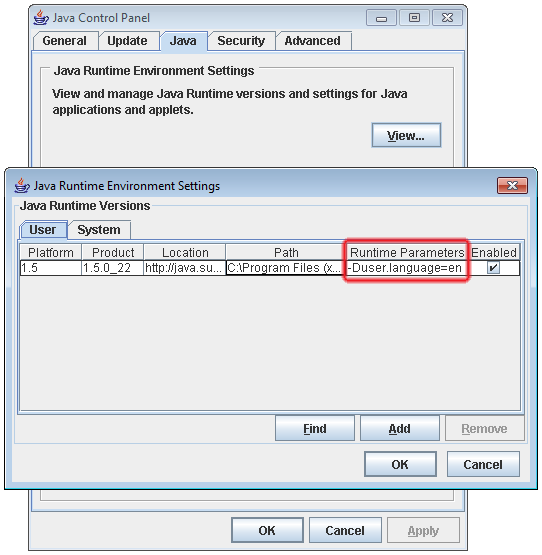
In the Java console, select the Java tab and click View. In the Runtime Parameters column highlighted below enter: -Duser.language=en. Doing this would set the language to English. Other languages would be available by replacing the value en as follows:
- de = German
- es = Spanish
- fr = French
- it = Italian
- ja = Japanese
- pt = Portuguese