
erck

Hi everyone,
I’m a framebuilder using BikeCAD Pro to design custom steel gravel frames. I’m currently working on frames with 700C wheels and Flatmount rear brake mounts for:
- Shimano GRX (e.g., BR-RX810, BR-RX400)
- SRAM XPLR (e.g., Apex, Rival)
On smaller frames (e.g., 48-50 cm), I sometimes run into geometry conflicts (interference with chainstays, derailleur, or clearance for up to 52 mm tires). I need the exact dimensions to input into BikeCAD Pro for these mounts, considering:
- 700C wheel size
- 425 mm chainstay length (for some models)
- Internal cable routing
I’ve checked manufacturer diagrams (Shimano/SRAM), but the dimensions aren’t always easy to translate into BikeCAD. If anyone has already modeled these Flatmount rear brakes in BikeCAD Pro for 700C wheels, could you share:
- The numerical values (mount spacing, height relative to axle, angle, etc.)?
- A BikeCAD file (.bcd) with these mounts configured?
- Screenshots of the parameters you used?
I’d be happy to share my own tests in return.
Thanks in advance!
Specs for flat mount disc brake mounts
There are several dropouts that have flat mounts included. Perhaps one of the dropouts you'll find there will suit your needs. Even if you want to braze a flat mount to your chainstay instead of using one built into the dropout, you can start with one of these flat mount dropouts and then switch the menu to choose some other dropout without disc mounts or select the option to define the dropout by parameters and design your own. In these cases, the disc mount dialog box should still retain the setting that were applied for the built in flat mount.
Here are some specs for a few of the flat mount dropouts included in BikeCAD. You need only choose one method to define the mounts, either Method 1 or Method 2, I've provided dimensions for both methods with Method 2 listed first as it is more commonly used in flat mount documentation.
Paragon DR2071
Method 2
F=34
M=16
N=36.5
∠1=0
Method 1
E=39.8
F=34
G=72.3
∠1=0
Paragon DR2073 with DR2077
Method 2
F=34
M=21.2
N=45
∠1=-3.96
Method 1
E=49.8
F=34.0
G=81.9
∠1=-3.96
Paragon DR2085
Method 2
F=34
M=16
N=36.5
∠1=0
Method 1
E=39.8
F=34
G=72.3
∠1=0
Paragon DR0102 (DR1102)
Method 2
F=34
M=15.9
N=36.5
∠1=-9.96
Method 1
E=39.8
F=34
G=72.3
∠1=-9.96
Clarification: Modeling Flatmount Brake Calipers (GRX, SRAM, Cam
Hi,
Sorry for the confusion in my previous message. Let me clarify:
I’m not looking for dropouts with integrated Flatmount tabs, but rather how to model the Flatmount brake calipers themselves (Shimano GRX, SRAM XPLR, and Campagnolo) in BikeCAD Pro.
Specifically, I need:
I’ve attached a screenshot to better illustrate my question. On smaller frames (for riders under 1.55 m), the caliper can sometimes interfere with the chainstay, so I need to ensure proper clearance.
If anyone has already modeled these calipers in BikeCAD or has the exact specs, I’d greatly appreciate the help!
Thanks,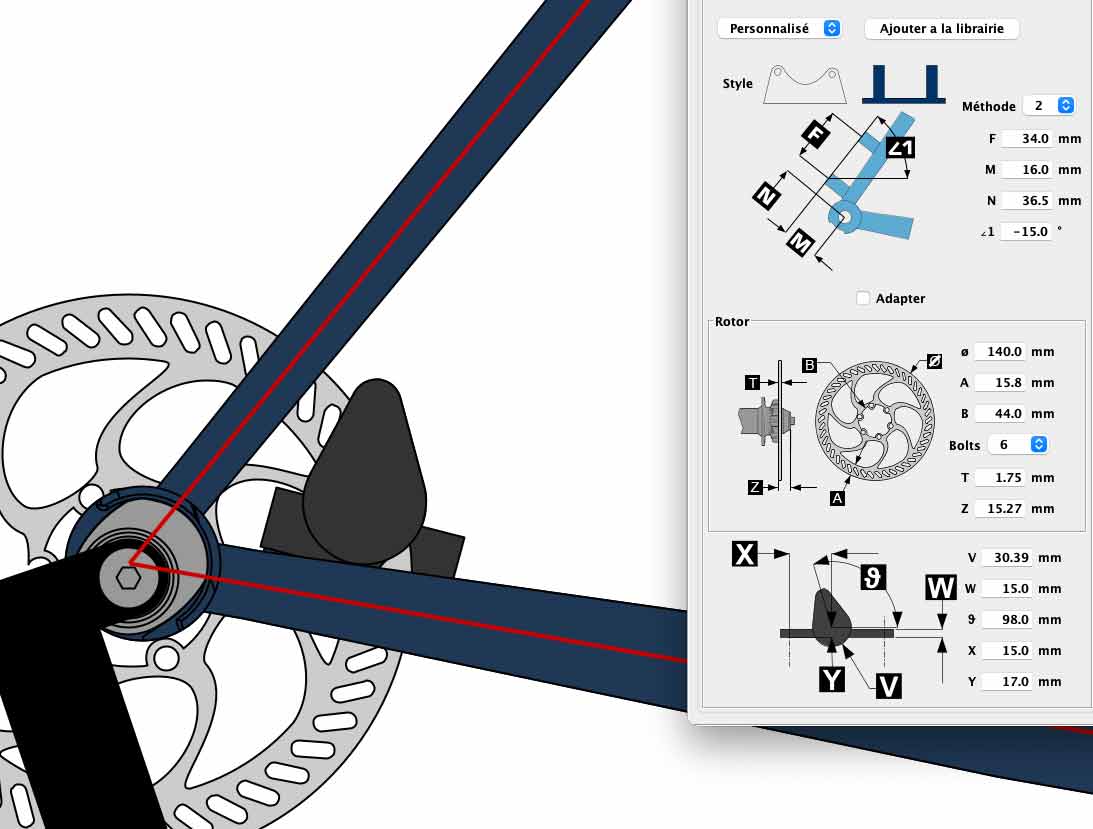
Éric
Flat mount specs
Since I don't have exact specs for the calipers you're looking to use, I'll hold out for someone else to answer that part, but I did provide specifications for mounting holes. Although they were taken from dropouts with built in mounts, those dimensions can be transferred to an independently placed mount. When tuning the final position, the one variable you can still play with is the angle which just rotates the entire assembly around the rear axle. You'll want to choose the angle that gets the caliper mounted as close to the chainstay as possible to maximize clearance with the seatstay.
Thanks
Hi Brent thanks for your message.